Tutorial 9 of 9
CNC G-code export
Advanced 15 min
Turn nested sheets into router G-code for GRBL, LinuxCNC or Fanuc-style controls — tool library, radius compensation, tabs, drilling cycles, cut order, simulation, machining time and DXF.
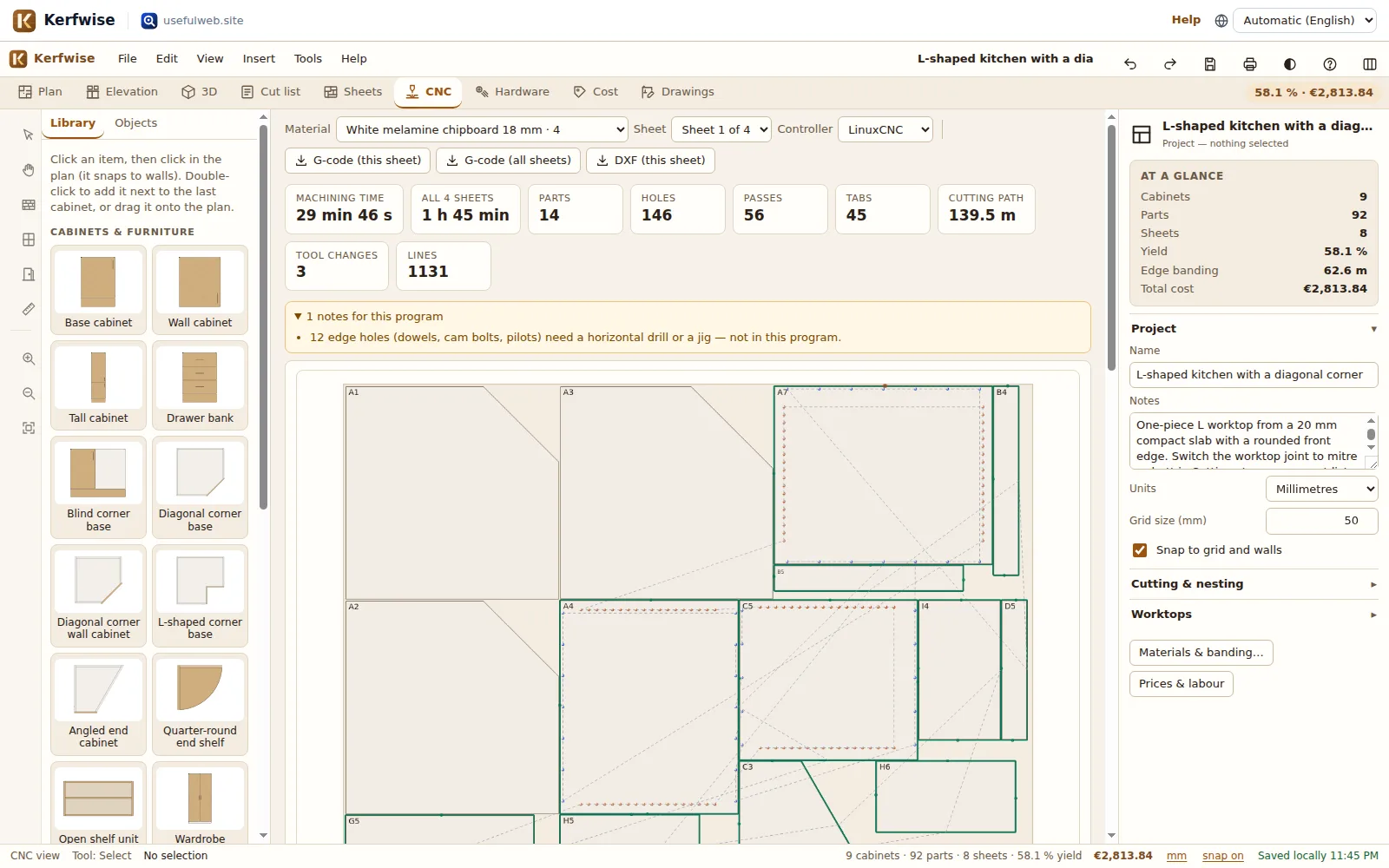
Kerfwise writes a complete program per nested sheet: drilling, helical bores, inner contours and outside profiles, with the tool-radius compensation already in the path. You see it in a 2D preview with a playback simulation before anything reaches the machine.
1. Prepare the nesting for a router
Open the template CNC-ready wardrobe wall (#template=cnc-wardrobe) or your own project and press 6 for CNC.
A router cuts a slot as wide as the cutter, so the parts must lie at least one cutter diameter apart. The template already uses a kerf of 8 mm for the Ø6 end mill, a trim of 15 mm (≥ the cutter radius) and MaxRects nesting. In your own projects Kerfwise checks this for you: if the kerf is smaller than the profile cutter, a warning offers Set kerf to 8 mm and re-nest; if the trim is smaller than the radius, it offers a new trim.
2. Machine, strategy and tools
On the right of the CNC view:
- Controller (top bar): GRBL (no canned cycles; tool changes as
M0pauses), LinuxCNC (T M6,G43,G81/G83) or Fanuc-style (%,Onumber,Nline numbers, decimal points). - Work zero: bottom-left corner of the sheet (Y up) or top-left (Y negative). Z0 is always the material top.
- Profile tool, Hold-down (tabs 8 × 2 mm, onion skin 0.3 mm or none for a vacuum table), Direction (climb or conventional), safe Z (15 mm), clearance Z (3 mm), overcut into the spoilboard (0.3 mm), ramp length (40 mm).
- Tool library: end mills and drills with diameter, rpm, feed, plunge feed and depth per pass (for drills: the peck depth, 0 = no peck). The defaults are a Ø6 compression end mill and drills Ø5 (shelf pins), Ø8 (dowels), Ø15 (cam housings) and a Ø35 Forstner bit (hinge cups).
Every setting is saved with the project.
3. What the program does
- Drilling, one tool at a time, in a nearest-neighbour tour: holes are matched to a drill of the same diameter (±0.25 mm). LinuxCNC and Fanuc-style programs use
G98 G81blocks (G83with a peck for holes deeper than 3 × Ø); GRBL gets the same moves written out, because GRBL has no drilling cycles. - Helical bores with the end mill for holes without a matching drill.
- Inner contours (sink and hob cut-outs in a one-piece worktop) offset inwards.
- Outside profiles from the smallest part to the largest, so small parts are cut while the sheet around them is still stiff.
Each profile is the part outline offset outward by the cutter radius: straight edges move along their normal and every outside corner becomes an arc (G2/G3) around the corner; inside corners of L-shaped parts are line intersections. The controller therefore runs with G40 — no G41/G42 needed. The cutter ramps down along the first edge instead of plunging, takes equal depth passes (18.3 mm in 4 passes for 18 mm material with a 6 mm step) and lifts over the tabs in the passes below the tab height. Rapid moves (G0) only happen at the clearance height or above.
Edge holes (dowels in panel edges, cam bolts) and angled pocket-screw holes cannot be drilled from above; they are counted in the notes so you can drill them with a horizontal drill or a jig. Parts whose holes are mostly on face B are machined face B up (the note tells you).
4. Preview and simulation
The preview draws the sheet, the parts and every move: one colour per tool, dashed grey for rapids, circles for drilled holes and a marker for the work zero. Play runs the program at 1×–64×; drag the slider to any move — the readout shows the tool and the X/Y/Z position. Below are the operations in machining order and the first 600 lines of the G-code.
The metrics show the machining time for this sheet and all sheets: feed moves at their feed rate, rapids at the rapid rate (10 m/min by default) and the tool-change time. Acceleration is not modelled, so real machines need 20–40 % longer.
5. Export
- G-code (this sheet) / G-code (all sheets) —
.gcode(GRBL),.ngc(LinuxCNC) or.nc(Fanuc-style), one file per sheet. - DXF (this sheet) — sheet, part outlines, cut-outs, labels, the toolpath as polylines and one layer per drill diameter and depth (for example
DRILL_D35_Z13), for your own CAM software.
Always simulate a program in your controller or CAM before the first run, check work zero and tool lengths, and start with the spindle above the material.
6. Without the workspace: the API tool
kerfwise-cnc-gcode does the same for a part list. This request (run against the real server) nests two doors with two Ø35 hinge cups each on a 1220 × 1000 sheet:
POST /api/v1/tools/kerfwise-cnc-gcode/calculate
content-type: application/json

{"parts":[{"name":"Door","length":716,"width":446,"qty":2}],
 "holes":[{"part":1,"x":100,"y":22.5,"diameter":35,"depth":13},{"part":1,"x":616,"y":22.5,"diameter":35,"depth":13}],
 "sheetLength":1220,"sheetWidth":1000,"thickness":19,"dialect":"linuxcnc"}
The summary reads 2 parts on 1 sheet; sheet 1: 161 lines of linuxcnc G-code, 8 profile passes, 4 holes, about 4 min 27 s. and the program starts with the hinge cups as one canned cycle:
T4 M6
G43 H4
S4000 M3
G4 P2
(Drill D35: 4 holes)
G0 Z15
G0 X115 Y510.5
G0 Z3
G98 G81 X115 Y510.5 Z-13 R3 F600
X115 Y962.5
X631 Y962.5
X631 Y510.5
G80
Parts can also be L-shapes ("shape":"l","a":…,"b":…), corner cuts ("chamfer") or quarter rounds ("quarter"). Via MCP the tool is called kerfwise_cnc_gcode.