チュートリアル 7 / 21
API と MCP で Kerfwise を自動化する
上級 15分
スクリプトや AI エージェントから Kerfwise のエンジンを呼び出しましょう。キャビネットビルダー、木取り表、板取り、CNC G-code を JSON API と MCP ツールとして、実際のリクエストとレスポンスの例付きで紹介します。
ワークスペースと API は 同じエンジンのコード で動いています。どの usefulweb.site ホストでも、4 つのツールが JSON API(POST /api/v1/tools/<id>/calculate)、OpenAPI ドキュメント、MCP ツール(POST /mcp、ツール名はアンダースコア区切り)として利用できます。
| ツール ID | MCP 名 | 機能 |
|---|---|---|
kerfwise-cabinet-builder | kerfwise_cabinet_builder | パラメーター → 部材、切断寸法、穴の数、金物、正面/側面 SVG、DXF、プロジェクト JSON |
kerfwise-cut-list | kerfwise_cut_list | キャビネットまたはプロジェクト → まとめた木取り表、木口テープ、金物、材料ごとの板、コスト見積もり、CSV |
kerfwise-sheet-nesting | kerfwise_sheet_nesting | 部材(L 字、角落とし、扇形も可)+板+切り幅 → 配置、歩留まり、下限+差、端材、切断長、SVG+DXF |
kerfwise-cnc-gcode | kerfwise_cnc_gcode | 部材+穴+板+刃物 → 割り付けた板、G-code(GRBL/LinuxCNC/Fanuc 系)、ツールパス SVG、DXF、加工時間 |
長さの単位はすべてミリです。以下の例は実際のサーバーで実行したもので、数値はレスポンスからそのまま写しています。
1. 部材を板に割り付ける
POST /api/v1/tools/kerfwise-sheet-nesting/calculate
Content-Type: application/json

{"parts":[{"name":"Side","length":720,"width":559,"qty":4,"grain":true},
           {"name":"Shelf","length":562,"width":515,"qty":4,"grain":true}],
 "sheetLength":2800,"sheetWidth":2070,"kerf":4,"trim":10,
 "method":"guillotine","grainedMaterial":true,"sheetPrice":148}
レスポンス(抜粋):
{
  "summary": "8 of 8 parts fit on 1 sheet of 2800 × 2070 mm with 47.8 % yield (guillotine).",
  "result": {
    "method": "guillotine",
    "strategy": "guillotine BSSF/LLAS, sorted by area",
    "sheetCount": 1,
    "yieldPct": 47.8,
    "offcutAreaM2": 2.75,
    "cutLengthM": 22.2,
    "cost": 148,
    "sheets": [{
      "index": 1,
      "placements": [
        {"name": "Side", "label": "1.1", "x": 10, "y": 10, "w": 720, "h": 559, "rotated": false},
        {"name": "Side", "label": "1.2", "x": 734, "y": 10, "w": 720, "h": 559, "rotated": false}
      ],
      "offcuts": [{"x": 10, "y": 1136, "w": 2780, "h": 924}, {"x": 2432, "y": 573, "w": 358, "h": 519}]
    }]
  }
}
切り幅に注目してください。2 枚目の側板は x = 10 + 720 + 4 = 734 から始まります。レスポンスの presentation 部分には、各板の SVG と DXF のダウンロードも含まれます。
2. キャビネットを作る
POST /api/v1/tools/kerfwise-cabinet-builder/calculate
Content-Type: application/json

{"type":"base","width":600,"height":870,"depth":560,"backType":"groove","grooveDepth":8,
 "plinthType":"legs","plinthHeight":150,"doorCount":1,"shelfCount":1,"topType":"rails"}
{
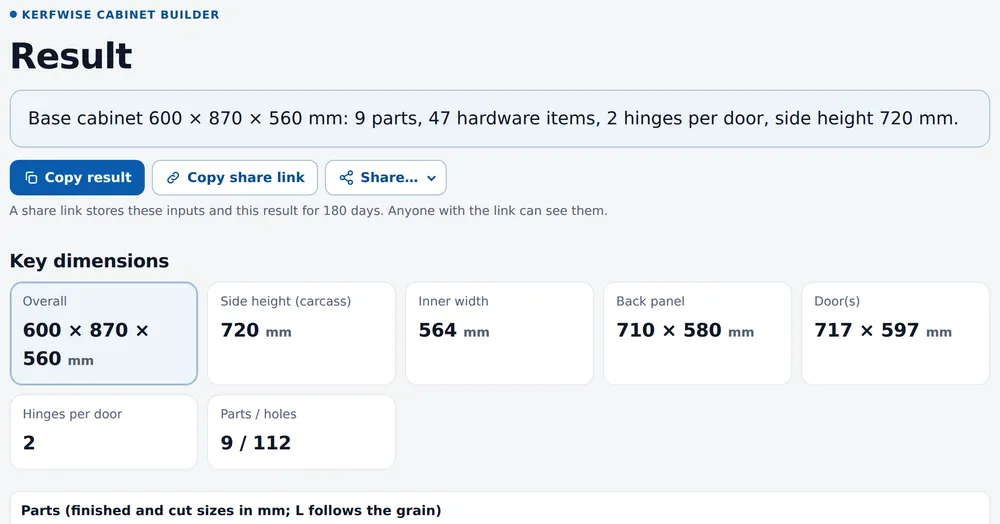
"summary": "Base cabinet 600 × 870 × 560 mm: 9 parts, 47 hardware items, 2 hinges per door, side height 720 mm.",
"result": {
"dimensions": {"sideHeight": 720, "innerWidth": 564, "innerDepth": 536, "backSize": "710 × 580", "doorSize": "717 × 597", "hingesPerDoor": 2},
"parts": [
{"label": "A7", "name": "Back panel (grooved)", "L": 710, "W": 580, "T": 8, "cutL": 710, "cutW": 580, "material": "HDF 8 mm (backs, grooved)"}
],
"totals": {"parts": 9, "holes": 112, "areaM2": 2.45, "bandingM": 6.4},
"openInApp": "https://kerfwise.usefulweb.site/app#project=eyJmb3…"
}
}openInApp はワークスペースでキャビネットを開き、project には同じプロジェクトが JSON で入っています。
3. 複数キャビネットの木取り表とコスト
POST /api/v1/tools/kerfwise-cut-list/calculate
Content-Type: application/json

{"cabinets":[{"type":"base","width":600,"doors":1,"shelves":1},
             {"type":"drawer","width":600,"drawers":3},
             {"type":"wall","width":800,"doors":2}],
 "currency":"EUR","labourRate":45}
{
"summary": "Cut list: 44 parts in 19 cut-list rows on 4 sheets (yield 44.1 %), 26 m edge banding — estimated total 868.78 EUR.",
"result": {
"cost": {"materials": 499, "banding": 19.05, "hardware": 164.2, "labour": 186.53, "labourMinutes": 248.7, "subtotal": 868.78, "total": 868.78, "currency": "EUR"},
"totals": {"cabinets": 3, "partRows": 19, "pieces": 44, "holes": 266, "sheets": 4, "sheetYieldPct": 44.1, "bandingM": 26}
}
}cabinets の表の代わりに、project にプロジェクト全体を文字列で渡すこともできます(.kerfwise.json ファイル。スキーマは Kerfwise の紹介ページと OpenAPI ドキュメントで公開されています)。プロジェクト内の設定(切り幅、価格、人件費)がフォームの項目より優先されます。
4. MCP で同じことをする
{"jsonrpc":"2.0","id":1,"method":"tools/call",
 "params":{"name":"kerfwise_sheet_nesting",
   "arguments":{"parts":[{"name":"Panel","length":600,"width":500,"qty":16}],
     "sheetLength":2800,"sheetWidth":2070,"kerf":4,"trim":10,"method":"guillotine","grainedMaterial":false}}}
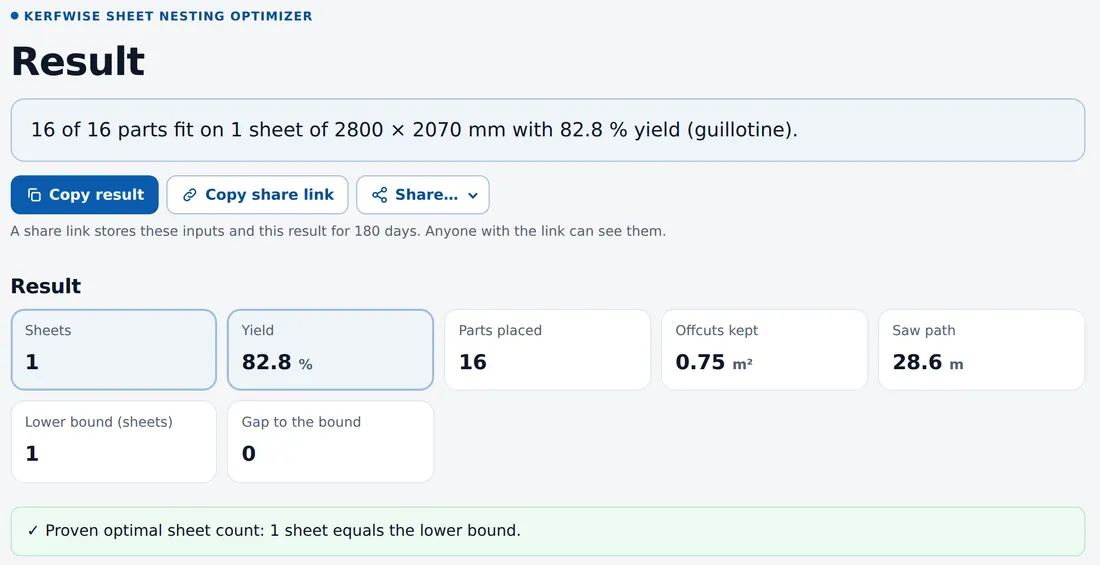
回答のテキストは 16 of 16 parts fit on 1 sheet of 2800 × 2070 mm with 82.8 % yield (guillotine). で始まり、structuredContent には API と同じ result オブジェクトが入っています。
5. プロジェクトを人に渡す
プロジェクト JSON を作成し(プロジェクトのスキーマを参照)、base64url でエンコードしてアプリの URL に付け加えます。
https://kerfwise.usefulweb.site/app#project=<base64url of the JSON>フラグメントがサーバーに送られることはありません。アプリがデコードしてプロジェクトを開き、アドレスバーから取り除きます。
試してみませんか?