Tutorial 7 di 21
Automatizzare Kerfwise con l'API e MCP
Avanzato 15 min
Richiama il motore di Kerfwise da script e agenti IA: generatore di mobili, distinta di taglio, nesting dei pannelli e G-code CNC come API JSON e strumenti MCP, con esempi reali di richieste e risposte.
L'area di lavoro e l'API eseguono lo stesso codice del motore. Quattro strumenti sono disponibili su ogni host usefulweb.site come API JSON (POST /api/v1/tools/<id>/calculate), nel documento OpenAPI e come strumenti MCP (POST /mcp, nomi degli strumenti con trattini bassi).
| Id dello strumento | Nome MCP | Cosa fa |
|---|---|---|
kerfwise-cabinet-builder | kerfwise_cabinet_builder | parametri → pezzi, misure di taglio, numero di forature, ferramenta, SVG frontale/laterale, DXF, JSON del progetto |
kerfwise-cut-list | kerfwise_cut_list | mobili o un progetto → distinta di taglio raggruppata, bordature, ferramenta, pannelli per materiale, stima dei costi, CSV |
kerfwise-sheet-nesting | kerfwise_sheet_nesting | pezzi (anche a L, angoli tagliati, quarti di cerchio) + pannello + spessore di taglio → layout, resa, limite inferiore + scarto, sfridi, lunghezza di taglio, SVG + DXF |
kerfwise-cnc-gcode | kerfwise_cnc_gcode | pezzi + fori + pannello + fresa → pannello disposto, G-code (GRBL / LinuxCNC / stile Fanuc), SVG dei percorsi utensile, DXF, tempo di lavorazione |
Tutte le lunghezze sono in millimetri. Gli esempi qui sotto sono stati eseguiti sul server reale; i numeri sono copiati dalle risposte.
1. Disporre pezzi su un pannello
POST /api/v1/tools/kerfwise-sheet-nesting/calculate
Content-Type: application/json

{"parts":[{"name":"Side","length":720,"width":559,"qty":4,"grain":true},
           {"name":"Shelf","length":562,"width":515,"qty":4,"grain":true}],
 "sheetLength":2800,"sheetWidth":2070,"kerf":4,"trim":10,
 "method":"guillotine","grainedMaterial":true,"sheetPrice":148}
Risposta (abbreviata):
{
  "summary": "8 of 8 parts fit on 1 sheet of 2800 × 2070 mm with 47.8 % yield (guillotine).",
  "result": {
    "method": "guillotine",
    "strategy": "guillotine BSSF/LLAS, sorted by area",
    "sheetCount": 1,
    "yieldPct": 47.8,
    "offcutAreaM2": 2.75,
    "cutLengthM": 22.2,
    "cost": 148,
    "sheets": [{
      "index": 1,
      "placements": [
        {"name": "Side", "label": "1.1", "x": 10, "y": 10, "w": 720, "h": 559, "rotated": false},
        {"name": "Side", "label": "1.2", "x": 734, "y": 10, "w": 720, "h": 559, "rotated": false}
      ],
      "offcuts": [{"x": 10, "y": 1136, "w": 2780, "h": 924}, {"x": 2432, "y": 573, "w": 358, "h": 519}]
    }]
  }
}
Nota lo spessore di taglio: il secondo fianco inizia a x = 10 + 720 + 4 = 734. La parte presentation della risposta contiene anche l'SVG di ogni pannello e un download DXF.
2. Generare un mobile
POST /api/v1/tools/kerfwise-cabinet-builder/calculate
Content-Type: application/json

{"type":"base","width":600,"height":870,"depth":560,"backType":"groove","grooveDepth":8,
 "plinthType":"legs","plinthHeight":150,"doorCount":1,"shelfCount":1,"topType":"rails"}
{
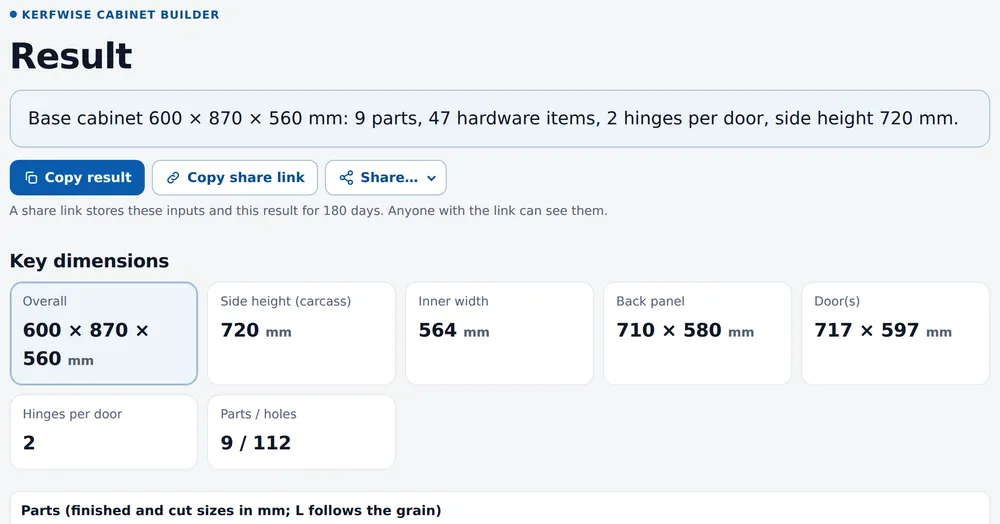
"summary": "Base cabinet 600 × 870 × 560 mm: 9 parts, 47 hardware items, 2 hinges per door, side height 720 mm.",
"result": {
"dimensions": {"sideHeight": 720, "innerWidth": 564, "innerDepth": 536, "backSize": "710 × 580", "doorSize": "717 × 597", "hingesPerDoor": 2},
"parts": [
{"label": "A7", "name": "Back panel (grooved)", "L": 710, "W": 580, "T": 8, "cutL": 710, "cutW": 580, "material": "HDF 8 mm (backs, grooved)"}
],
"totals": {"parts": 9, "holes": 112, "areaM2": 2.45, "bandingM": 6.4},
"openInApp": "https://kerfwise.usefulweb.site/app#project=eyJmb3…"
}
}openInApp apre il mobile nell'area di lavoro; project contiene lo stesso progetto in JSON.
3. Distinta di taglio e costi per più mobili
POST /api/v1/tools/kerfwise-cut-list/calculate
Content-Type: application/json

{"cabinets":[{"type":"base","width":600,"doors":1,"shelves":1},
             {"type":"drawer","width":600,"drawers":3},
             {"type":"wall","width":800,"doors":2}],
 "currency":"EUR","labourRate":45}
{
"summary": "Cut list: 44 parts in 19 cut-list rows on 4 sheets (yield 44.1 %), 26 m edge banding — estimated total 868.78 EUR.",
"result": {
"cost": {"materials": 499, "banding": 19.05, "hardware": 164.2, "labour": 186.53, "labourMinutes": 248.7, "subtotal": 868.78, "total": 868.78, "currency": "EUR"},
"totals": {"cabinets": 3, "partRows": 19, "pieces": 44, "holes": 266, "sheets": 4, "sheetYieldPct": 44.1, "bandingM": 26}
}
}Al posto della tabella cabinets puoi passare un intero progetto come stringa in project (un file .kerfwise.json; lo schema è pubblicato sulla pagina di Kerfwise e nel documento OpenAPI). Le impostazioni contenute nel progetto (spessore di taglio, prezzi, manodopera) prevalgono sui campi del modulo.
4. La stessa cosa via MCP
{"jsonrpc":"2.0","id":1,"method":"tools/call",
 "params":{"name":"kerfwise_sheet_nesting",
   "arguments":{"parts":[{"name":"Panel","length":600,"width":500,"qty":16}],
     "sheetLength":2800,"sheetWidth":2070,"kerf":4,"trim":10,"method":"guillotine","grainedMaterial":false}}}
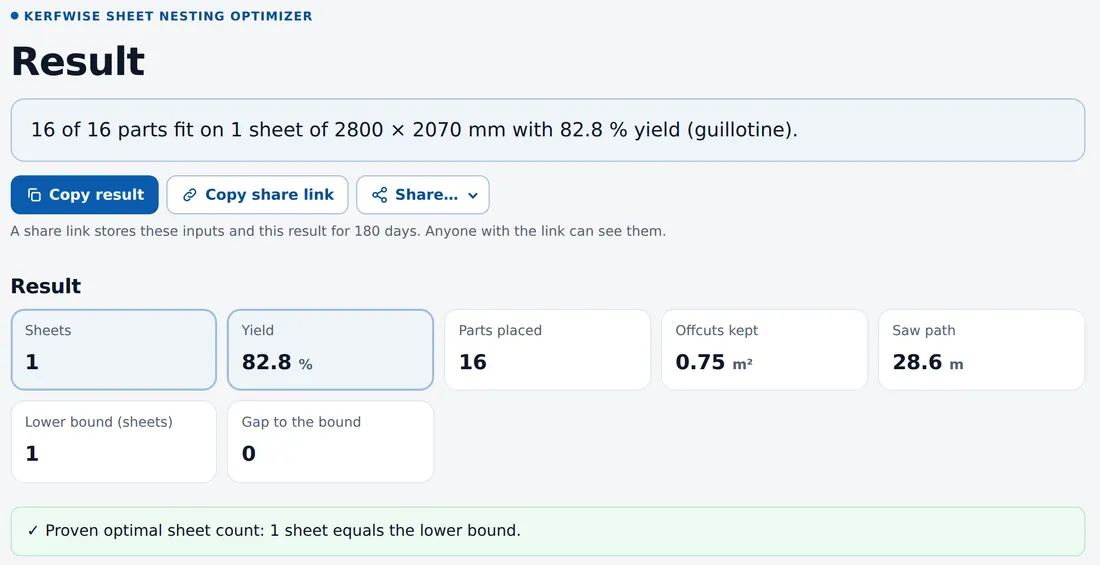
Il contenuto testuale della risposta inizia con 16 of 16 parts fit on 1 sheet of 2800 × 2070 mm with 82.8 % yield (guillotine). e structuredContent contiene lo stesso oggetto result dell'API.
5. Passare un progetto a una persona
Crea un JSON di progetto (vedi lo schema del progetto), codificalo in base64url e aggiungilo all'URL dell'app:
https://kerfwise.usefulweb.site/app#project=<base64url of the JSON>Il frammento non raggiunge mai il server; l'app lo decodifica, apre il progetto e lo rimuove dalla barra degli indirizzi.
Pronto a provarlo?