ट्यूटोरियल 7 / 21
API और MCP से Kerfwise को ऑटोमेट करो
उन्नत 15 मिनट
स्क्रिप्ट और AI एजेंट से Kerfwise इंजन कॉल करो — कैबिनेट बिल्डर, कट लिस्ट, शीट नेस्टिंग और CNC G-code, JSON API और MCP टूल के रूप में, असली रिक्वेस्ट और रिस्पॉन्स उदाहरणों के साथ।
वर्कस्पेस और API एक ही इंजन कोड चलाते हैं। हर usefulweb.site होस्ट पर चार टूल JSON API (POST /api/v1/tools/<id>/calculate) के रूप में, OpenAPI दस्तावेज़ में और MCP टूल (POST /mcp, अंडरस्कोर वाले टूल नाम) के रूप में उपलब्ध हैं।
| टूल id | MCP नाम | यह क्या करता है |
|---|---|---|
kerfwise-cabinet-builder | kerfwise_cabinet_builder | पैरामीटर → पार्ट्स, कट आकार, ड्रिलिंग की गिनती, हार्डवेयर, फ़्रंट/साइड SVG, DXF, प्रोजेक्ट JSON |
kerfwise-cut-list | kerfwise_cut_list | कैबिनेट या प्रोजेक्ट → समूहित कट लिस्ट, बैंडिंग, हार्डवेयर, प्रति सामग्री शीटें, लागत अनुमान, CSV |
kerfwise-sheet-nesting | kerfwise_sheet_nesting | पार्ट्स (L-आकार, कटे कोने, क्वार्टर-राउंड भी) + शीट + कर्फ़ → लेआउट, यील्ड, निचली सीमा + गैप, ऑफ़कट, कट लंबाई, SVG + DXF |
kerfwise-cnc-gcode | kerfwise_cnc_gcode | पार्ट्स + छेद + शीट + कटर → नेस्ट की गई शीट, G-code (GRBL / LinuxCNC / Fanuc-शैली), टूलपाथ SVG, DXF, मशीनिंग समय |
सभी लंबाइयाँ मिलीमीटर में हैं। नीचे के उदाहरण असली सर्वर पर चलाए गए थे; संख्याएँ रिस्पॉन्स से कॉपी की गई हैं।
1. पार्ट्स को शीट पर नेस्ट करो
POST /api/v1/tools/kerfwise-sheet-nesting/calculate
Content-Type: application/json

{"parts":[{"name":"Side","length":720,"width":559,"qty":4,"grain":true},
           {"name":"Shelf","length":562,"width":515,"qty":4,"grain":true}],
 "sheetLength":2800,"sheetWidth":2070,"kerf":4,"trim":10,
 "method":"guillotine","grainedMaterial":true,"sheetPrice":148}
रिस्पॉन्स (संक्षिप्त):
{
  "summary": "8 of 8 parts fit on 1 sheet of 2800 × 2070 mm with 47.8 % yield (guillotine).",
  "result": {
    "method": "guillotine",
    "strategy": "guillotine BSSF/LLAS, sorted by area",
    "sheetCount": 1,
    "yieldPct": 47.8,
    "offcutAreaM2": 2.75,
    "cutLengthM": 22.2,
    "cost": 148,
    "sheets": [{
      "index": 1,
      "placements": [
        {"name": "Side", "label": "1.1", "x": 10, "y": 10, "w": 720, "h": 559, "rotated": false},
        {"name": "Side", "label": "1.2", "x": 734, "y": 10, "w": 720, "h": 559, "rotated": false}
      ],
      "offcuts": [{"x": 10, "y": 1136, "w": 2780, "h": 924}, {"x": 2432, "y": 573, "w": 358, "h": 519}]
    }]
  }
}
कर्फ़ पर ध्यान दो: दूसरी साइड x = 10 + 720 + 4 = 734 से शुरू होती है। रिस्पॉन्स के presentation भाग में हर शीट का SVG और एक DXF डाउनलोड भी होता है।
2. एक कैबिनेट बनाएँ
POST /api/v1/tools/kerfwise-cabinet-builder/calculate
Content-Type: application/json

{"type":"base","width":600,"height":870,"depth":560,"backType":"groove","grooveDepth":8,
 "plinthType":"legs","plinthHeight":150,"doorCount":1,"shelfCount":1,"topType":"rails"}
{
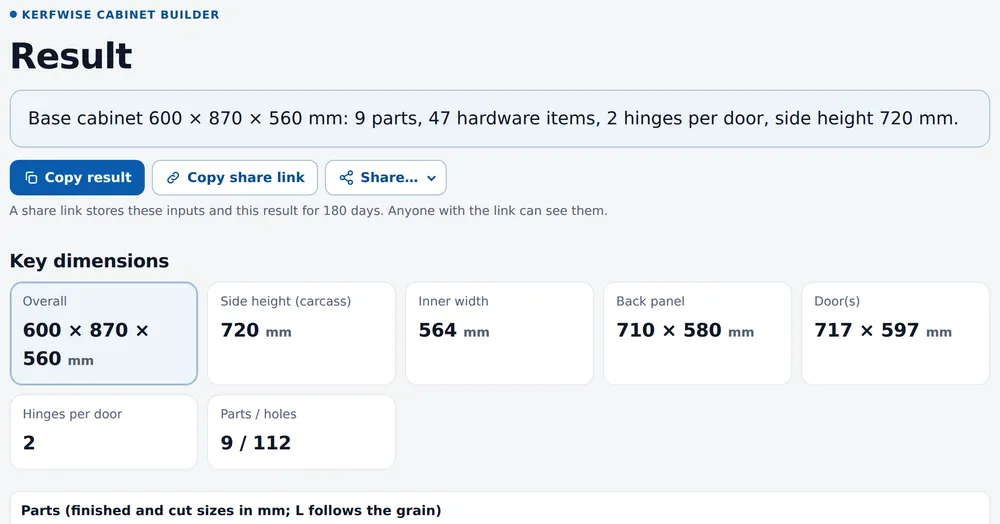
"summary": "Base cabinet 600 × 870 × 560 mm: 9 parts, 47 hardware items, 2 hinges per door, side height 720 mm.",
"result": {
"dimensions": {"sideHeight": 720, "innerWidth": 564, "innerDepth": 536, "backSize": "710 × 580", "doorSize": "717 × 597", "hingesPerDoor": 2},
"parts": [
{"label": "A7", "name": "Back panel (grooved)", "L": 710, "W": 580, "T": 8, "cutL": 710, "cutW": 580, "material": "HDF 8 mm (backs, grooved)"}
],
"totals": {"parts": 9, "holes": 112, "areaM2": 2.45, "bandingM": 6.4},
"openInApp": "https://kerfwise.usefulweb.site/app#project=eyJmb3…"
}
}openInApp कैबिनेट को वर्कस्पेस में खोलता है; project में वही प्रोजेक्ट JSON के रूप में होता है।
3. कई कैबिनेट के लिए कट लिस्ट और लागत
POST /api/v1/tools/kerfwise-cut-list/calculate
Content-Type: application/json

{"cabinets":[{"type":"base","width":600,"doors":1,"shelves":1},
             {"type":"drawer","width":600,"drawers":3},
             {"type":"wall","width":800,"doors":2}],
 "currency":"EUR","labourRate":45}
{
"summary": "Cut list: 44 parts in 19 cut-list rows on 4 sheets (yield 44.1 %), 26 m edge banding — estimated total 868.78 EUR.",
"result": {
"cost": {"materials": 499, "banding": 19.05, "hardware": 164.2, "labour": 186.53, "labourMinutes": 248.7, "subtotal": 868.78, "total": 868.78, "currency": "EUR"},
"totals": {"cabinets": 3, "partRows": 19, "pieces": 44, "holes": 266, "sheets": 4, "sheetYieldPct": 44.1, "bandingM": 26}
}
}cabinets टेबल के बजाय तुम project में पूरा प्रोजेक्ट एक स्ट्रिंग के रूप में भेज सकते हो (एक .kerfwise.json फ़ाइल — इसका स्कीमा Kerfwise लैंडिंग पेज और OpenAPI दस्तावेज़ में प्रकाशित है)। प्रोजेक्ट के अंदर की सेटिंग्स (कर्फ़, कीमतें, श्रम) फ़ॉर्म फ़ील्ड पर प्राथमिकता पाती हैं।
4. यही MCP से
{"jsonrpc":"2.0","id":1,"method":"tools/call",
 "params":{"name":"kerfwise_sheet_nesting",
   "arguments":{"parts":[{"name":"Panel","length":600,"width":500,"qty":16}],
     "sheetLength":2800,"sheetWidth":2070,"kerf":4,"trim":10,"method":"guillotine","grainedMaterial":false}}}
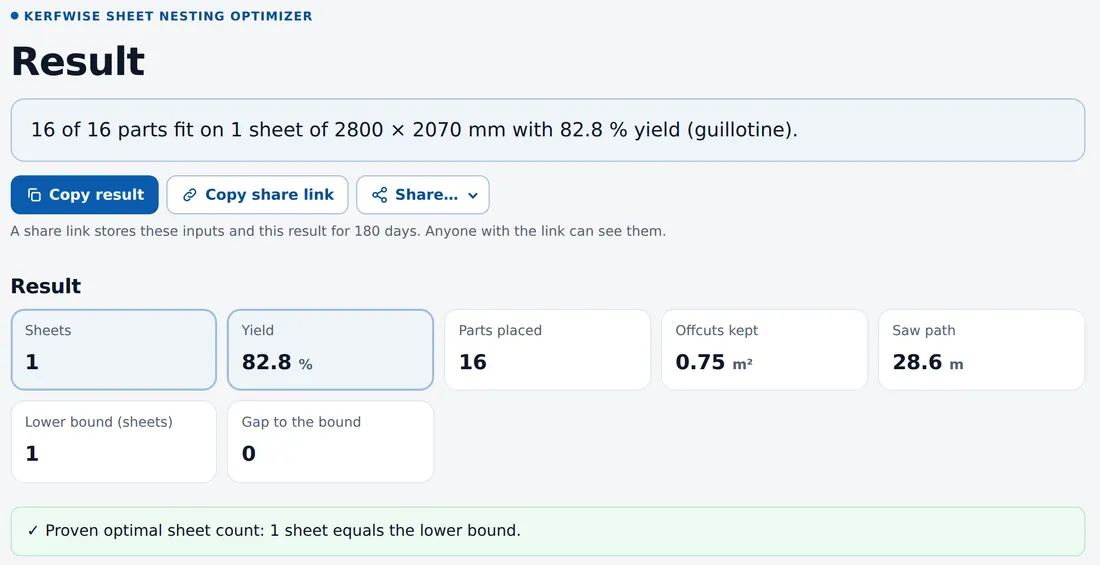
जवाब का टेक्स्ट कंटेंट 16 of 16 parts fit on 1 sheet of 2800 × 2070 mm with 82.8 % yield (guillotine). से शुरू होता है और structuredContent में API वाला ही result ऑब्जेक्ट होता है।
5. प्रोजेक्ट किसी इंसान को सौंपो
एक प्रोजेक्ट JSON बनाओ (प्रोजेक्ट स्कीमा देखो), उसे base64url में एन्कोड करो और ऐप URL के आगे जोड़ दो:
https://kerfwise.usefulweb.site/app#project=<base64url of the JSON>फ़्रैगमेंट कभी सर्वर तक नहीं पहुँचता; ऐप उसे डिकोड करता है, प्रोजेक्ट खोलता है और उसे एड्रेस बार से हटा देता है।
आज़माने के लिए तैयार?